
 te4gh0st
4551ebc220
Added new example
te4gh0st
4551ebc220
Added new example
|
1 år sedan | |
|---|---|---|
| assets | 1 år sedan | |
| example | 1 år sedan | |
| .gitignore | 1 år sedan | |
| LICENSE | 1 år sedan | |
| README.md | 1 år sedan | |
| mdat.py | 1 år sedan |
README.md
Miflare Dump Analyse Tool (mdat.py)


🛠 A powerful command-line utility for analyzing and manipulating MIFARE Classic 1K/4K card dumps.
✨ Features
- 🗂 Load and display
.bindumps from MIFARE Classic 1K (16 sectors) and 4K (64 sectors) cards - 🧬 Visual representation of key data structures
- 🔍 Highlight UID, BCC, ATQA, and SAK values
- 🧠 Decode and generate access bits
- 🧮 BCC calculation from custom UIDs
- 🔄 Compare two dumps, with diff-only mode
- 🌍 Multilingual: English (default) and Russian (
--lang ru)
🔧 Installation
Clone the repository and run:
git clone https://github.com/te4gh0st/Miflare-Dump-Analyse-Tool.git
cd Miflare-Dump-Analyse-Tool
Then run the tool with:
mdat.py --help
````
txt usage: mdat.py [-h] [--bits] [--lang {en,ru}] [--calc-bcc BYTE [BYTE ...]] [--calc-access HEX HEX HEX] [--gen-access] [--compare DUMP1 DUMP2] [--diff-only] [dump]
Miflare Dump Analyse Tool Copyright (c) 2025 te4gh0st
positional arguments: dump .bin dump file
options: -h, --help show this help message and exit --bits, -b Show bits view (Показать биты) --lang {en,ru} Language / Язык --calc-bcc BYTE [BYTE ...]
Calculate BCC for UID bytes (Вычислить BCC для байт UID)
--calc-access HEX HEX HEX
Decode access bytes FF 07 08 (Декодировать байты доступа FF 07 08)
--gen-access Generate access bytes interactively (Интерактивная генерация бит доступа) --compare DUMP1 DUMP2
Compare two dumps (Сравнить два дампа)
--diff-only Show only differences when comparing (Только различия)
Here's the updated `README` with examples added and descriptions in English:
---
# Miflare Dump Analyse Tool (mdat.py)


🛠 A powerful command-line utility for analyzing and manipulating MIFARE Classic 1K/4K card dumps.
## ✨ Features
* 🗂 Load and display `.bin` dumps from MIFARE Classic 1K (16 sectors) and 4K (64 sectors) cards
* 🧬 Visual representation of key data structures
* 🔍 Highlight UID, BCC, ATQA, and SAK values
* 🧠 Decode and generate access bits
* 🧮 BCC calculation from custom UIDs
* 🔄 Compare two dumps, with diff-only mode
* 🌍 Multilingual: English (default) and Russian (`--lang ru`)
## 🔧 Installation
Clone the repository and run:
bash git clone https://github.com/te4gh0st/Miflare-Dump-Analyse-Tool.git cd Miflare-Dump-Analyse-Tool
## Then run the tool with:
bash python mdat.py --help
txt usage: mdat.py [-h] [--bits] [--lang {en,ru}] [--calc-bcc BYTE [BYTE ...]] [--calc-access HEX HEX HEX] [--gen-access] [--compare DUMP1 DUMP2] [--diff-only] [dump]
Miflare Dump Analyse Tool Copyright (c) 2025 te4gh0st
positional arguments: dump .bin dump file
options: -h, --help show this help message and exit --bits, -b Show bits view (Показать биты) --lang {en,ru} Language / Язык --calc-bcc BYTE [BYTE ...]
Calculate BCC for UID bytes (Вычислить BCC для байт UID)
--calc-access HEX HEX HEX
Decode access bytes FF 07 08 (Декодировать байты доступа FF 07 08)
--gen-access Generate access bytes interactively (Интерактивная генерация бит доступа) --compare DUMP1 DUMP2
Compare two dumps (Сравнить два дампа)
--diff-only Show only differences when comparing (Только различия)
---

## 📋 Examples of Usage

### 1. Load and Analyze a MIFARE Classic 1K Dump

To load and analyze a MIFARE Classic 1K dump, run the following command:
bash python3 mdat.py example/1.bin
**Example Output:**

### 2. Calculate the BCC for a Custom UID
To calculate the BCC for a given UID, use the following command:
bash python3 mdat.py --calc-bcc 00 AA BB
**Example Output:**
UID: 00 AA BB → BCC: 11
### 3. Compare Two Dumps and Show Only the Differences

To compare two dumps and display only the differences, run the following:
bash python3 mdat.py --compare example/1.bin example/2.bin --diff-only
**Example Output:**

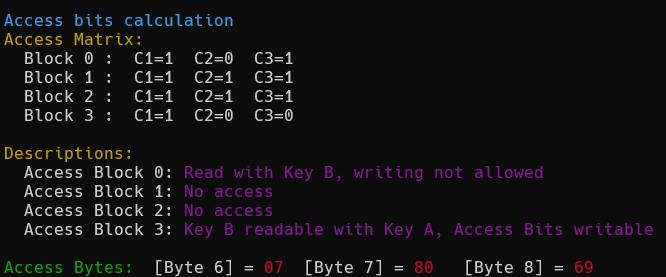
### 4. Decode Access Bits for a Given Value
To decode the access bits, use the following command:
bash python3 mdat.py --calc-access 07 80 69 ```
Example Output:
MIT License
Copyright (c) 2025 (te4gh0st) Vitaly Timtsurak